AI ASMR Prompts: Six Surreal Scenes with Clear Motion and Sound Cues
Create AI ASMR prompts for crystal fruit, soft textures, and impossible foods, with one action, camera, and audio directions you can refine after each attempt.

Quick Summary
AI ASMR prompts combine a close visual action with a sound that feels connected to it. These six original scene ideas explain the material, movement, camera, and conditional sound cue, followed by a workflow for checking the finished sequence.
Why Surreal Scenes Still Need Clear Timing
An impossible object can still have a readable action. The viewer should see where contact begins, how the material changes, and when the movement settles.
YouTube documented surreal AI ASMR in an August 2025 cultural-trend report. That provides historical context for the format without establishing current search demand or a guaranteed audience response. YouTube's August 2025 trend report
The surreal ASMR prompts below describe fictional materials. They are creative video concepts rather than instructions for making the scenes physically.
Choose one action first. A slice, press, brush, fold, and scoop each need a different visual progression and sound timing.
Key Takeaways
- Give the scene one recognizable object and action.
- Keep the camera close enough to show contact.
- Write visual and sound directions separately.
- Check the chosen model's audio support.
- Review audio timing against the actual output.
Six AI ASMR Prompts for Different Materials
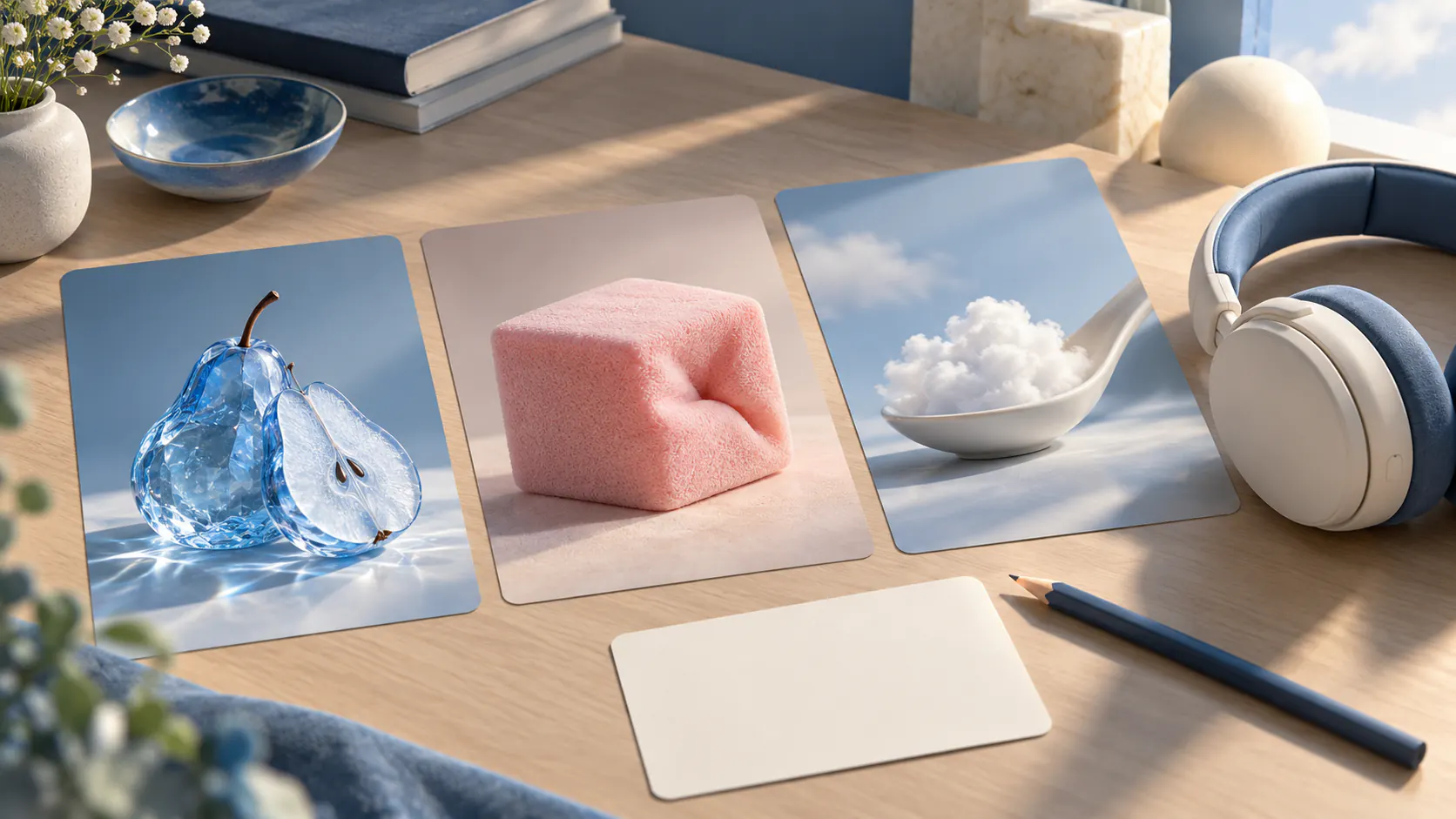
1. A crystal pear slice
A translucent blue crystal pear rests on a matte surface in a close tabletop view. A polished blade makes one slow slice through the fictional fruit, revealing luminous layers. The camera stays fixed. If audio is supported, a light crystalline crack begins at visible contact.
Best for: A clear surreal material reveal.
Review: The pear remains coherent and the sound starts with the action.
2. A soft foam cube press
A pale pink foam cube sits on a white tray. A smooth circular press lowers once, compressing the cube evenly before lifting away. The foam gradually returns to its original form. Use a fixed close view and, if supported, a quiet airy compression sound.
Best for: A simple repeating action.
Review: The cube compresses consistently and settles without changing into another object.
3. A liquid marble fold
A small sheet with a white marble pattern behaves like a thick flexible liquid. One edge folds inward, creating a rounded wave that settles on the surface. The camera remains overhead. If supported, use a low smooth folding sound with gentle surface contact.
Best for: A pattern moving with an impossible material.
Review: The marble pattern remains attached to the fold.
4. A brush through frost
A soft brush makes one slow pass through delicate frost on dark glass. A clean curved path appears behind the bristles while fine crystals gather at its edge. Keep the camera close and steady. If supported, add a quiet granular brushing sound.
Best for: A readable surface change.
Review: The cleared path follows the brush continuously rather than appearing elsewhere.
5. A spoonful of cloud
A porcelain bowl holds a dense luminous cloud with a soft cream-like texture. A spoon lifts one rounded portion, which changes shape gently while staying together. Hold a three-quarter close view. If supported, add a soft airy cue as the spoon rises.
Best for: A playful surreal food-like scene.
Review: The cloud stays connected during the scoop and the bowl retains its shape.
6. A patterned jelly release
Translucent amber jelly rests inside a shallow patterned mold. The mold lifts slowly, leaving the jelly standing with a clear geometric surface. A small wobble settles. Use a fixed tabletop view and, if supported, a gentle release sound followed by a soft movement cue.
Best for: A transformation with a definite ending.
Review: The pattern remains recognizable as the jelly moves.
Build Satisfying AI Video Prompts in Four Steps
- Write the visual brief. Define the object, material behavior, action, and camera. Keep the first version focused.
- Write the audio brief. Specify the sound's texture and the contact moment. Avoid adding several competing noises.
- Check the model. Explore the visual scene in Pitovee's video workspace and inspect the selected model's actual audio capabilities.
- Review a candidate. Judge the visual action first, then assess sound timing. Save the result and a concrete revision note.
If the model does not generate audio, use an appropriate editor to add the sound. A coherent visual scene can remain useful when its audio needs a separate workflow.
These satisfying AI video prompts are proposed instructions, not tested results.
Review Sound Against Visible Contact
Watch the clip muted. Identify the first contact, the main movement, and the point where the action ends.
Then listen while watching. Does the sound begin at contact? Does its texture suit the fictional material? Is there unwanted noise or an abrupt ending?
Listen separately as well. This can reveal distracting audio that the image makes less noticeable.
Replace or adjust the sound when needed. If the timing is wrong throughout, adding more visual complexity will not address that issue.
Keep claims about the viewing experience modest. ASMR is a creative format here; the scene does not promise relaxation or a particular physical response.
FAQ
What makes a useful glass fruit cutting prompt?
A clear fictional object, one visible cut, stable framing, and a sound cue tied to contact provide a manageable starting brief.
Do I need native audio?
No. Generate the visual scene first and add sound through an editing workflow when necessary.
Should I include several actions?
Begin with one so material continuity and timing are easier to evaluate.
Conclusion
Good AI ASMR prompts make a fictional material's movement easy to follow. Define one action, keep contact visible, and check the sound against the actual sequence. Refine the visual and audio separately before combining them into the finished clip.
Related articles
Explore Halloween AI video prompts for haunted gardens, ghostly rooms, and quiet suspense, with camera directions and practical checks for each original scene.
AI Camera Movement Prompts: Control Pans, Orbits, and Dolly ZoomsWrite AI camera movement prompts that describe the shot clearly, distinguish pans from tracking, and help you test orbits, push-ins, and dolly zoom effects.
AI Video Character Consistency: Keep One Character Across Your ScenesBuild AI video character consistency with clear references, a simple character sheet, scene planning, and careful checks before you edit your clips together.