AI Video Character Consistency: Keep One Character Across Your Scenes
Build AI video character consistency with clear references, a simple character sheet, scene planning, and careful checks before you edit your clips together.
Quick Summary
AI video character consistency means keeping the identifiers that make a person recognizable as the story moves between shots. This tutorial shows how to define those identifiers, prepare references, plan scene changes, and inspect continuity before editing the clips together.
Why AI Video Character Consistency Starts Before Animation
A character can look convincing in one clip and return with a different hairstyle, altered glasses, or a coat that no longer matches. Preventing that starts with a clear character specification.
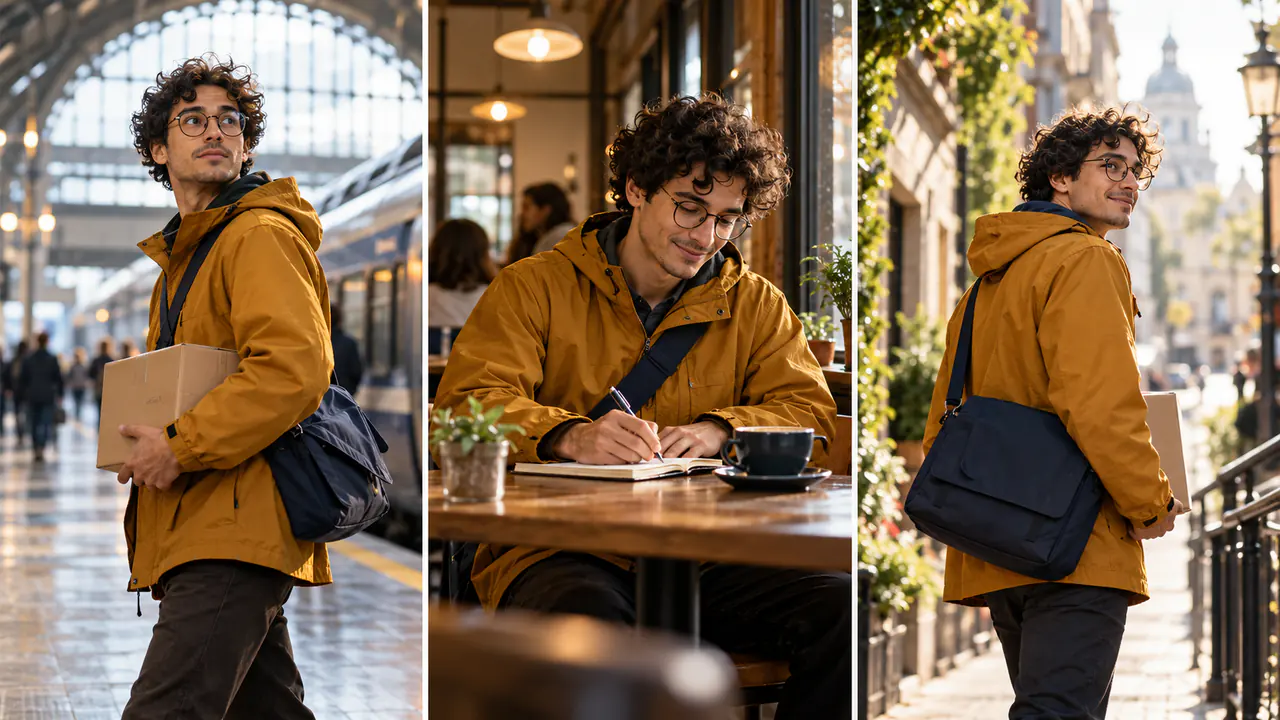
Separate fixed details from intentional changes. An original courier might have short dark curls, round glasses, an ochre raincoat, and a navy shoulder bag. Those are useful identifiers. Moving from a station into a café can change the lighting without changing the character's face.
Write these decisions down before generating the scene images. A planned wardrobe change belongs in the story notes; an accidental clothing change belongs in the review log. This gives you a concrete basis for accepting or rejecting a result.
Key Takeaways
- Define a small set of recognizable character details.
- Prepare references that agree on appearance and clothing.
- Compare scene stills before introducing movement.
- Inspect identity throughout each clip, including turns.
- Correct a specific mismatch rather than rewriting the whole character.
Prepare AI Character Reference Images
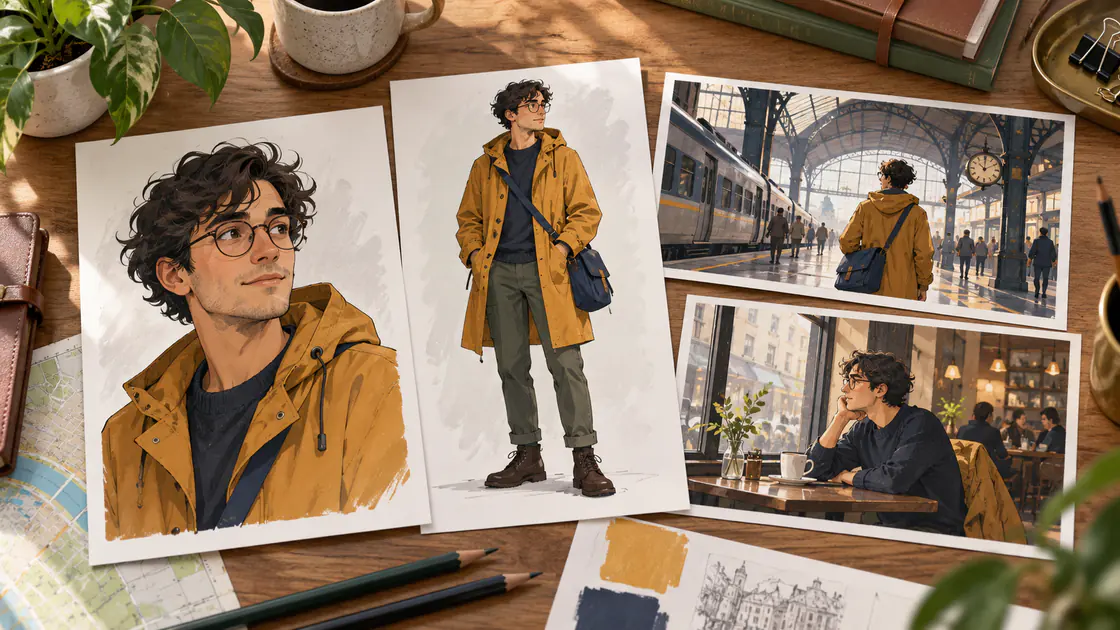
Begin with an unobstructed portrait and a full-body view showing the main outfit. Add other angles only when they resolve information the scene needs.
Runway's image-reference documentation describes a workflow for carrying character traits into generated images. That supports reference preparation as a useful starting idea, but it does not establish that another platform provides the same controls or syntax. Runway character-reference guidance
For the courier, prepare:
- A portrait with readable facial features.
- A full-body reference in the raincoat.
- A useful side or three-quarter view if the story needs it.
- A clear view of the recurring bag.
Keep the images compatible. Two different bags or conflicting hairstyles create an unclear brief. Name each asset by its role so you can choose it deliberately.
Build a Same Character, Multiple Scenes Plan
1. Write the character specification
List the fixed identifiers and any planned changes. For example:
Adult courier; short dark curls; round glasses; ochre raincoat; navy shoulder bag. Preserve these features across the station, café, and street scenes.
Avoid adding a long list of tiny details that are not visible in the intended framing. Focus on what the audience can recognize.
2. Plan each scene's contribution
Use a continuity table before creating stills.
| Scene | Fixed details | Intentional action |
|---|---|---|
| Station | Face, glasses, coat, bag | Waiting beside the platform |
| Café | Same appearance and outfit | Setting the bag beside a chair |
| Street | Same face and clothing | Approaching the delivery address |
This gives every scene a story purpose. It also clarifies which differences should be expected.
3. Inspect the still images together
Generate or prepare the scene references using the capabilities available in your chosen tool. Compare them side by side before animation.
Check facial structure, hairline, glasses, clothing seams, and prop size. If the café still already shows a different coat, correct that image before treating it as an animation source.
A coherent set of stills provides a clearer starting point for consistent characters in AI video.
4. Introduce restrained movement
You can try the scenes in Pitovee's video workspace, checking the selected model's reference method and controls first.
An original station prompt might read:
The courier looks toward the approaching train and makes a small adjustment to the shoulder strap. The camera stays at chest height in a steady medium view. The round glasses, ochre raincoat, and navy bag retain their appearance throughout.
For the café scene, start with a small gesture rather than a complicated interaction involving several objects. Add complexity only after the character remains recognizable.
Review Identity During Movement
Inspect frames from the beginning, middle, and end of each candidate clip. Pay attention to the moment a person turns or moves behind something.
Check the glasses' shape, the hairline, the coat's construction, and the bag's proportions. Consider lighting separately from identity: a warmer face under indoor light is different from a changed facial structure.
Write a precise observation when a clip fails:
The glasses become rectangular during the turn, while the coat remains stable.
Then revise the relevant reference or action. A smaller turn may be a useful test; a clearer angle may address missing visual information.
Do not adjust the entire character specification to accommodate one inconsistent scene. Preserve the accepted baseline and regenerate the affected shot where necessary.
Assemble Only the Coherent Scenes
Place the strongest clips in an editor and watch the transitions. Continuity differences can become more obvious when two shots are adjacent.
Check how the character's pose, direction, and prop position connect. Trim a weak moment when the remaining clip still serves its purpose. Regenerate when the mismatch persists through the important action.
Keep the accepted references and prompts together. That makes a later additional scene easier to plan around the established character.
FAQ
Do I need several reference images?
Not always. A clear single reference can support a simple shot. Add more views when the model supports them and the scene requires their information.
Can the character change clothing?
Yes, when the change is intentional. Record it in the continuity plan and preserve the identifiers that still connect the person across scenes.
Can editing solve every identity problem?
No. Editing can select useful moments, but it cannot reliably reconstruct a character whose appearance changes throughout a shot.
Conclusion
AI video character consistency depends on a clear specification, compatible references, and review across the whole sequence. Build a short story with recognizable details first, then introduce new actions and locations gradually. Keep the accepted character baseline available for every additional scene.
Related articles
Create AI ASMR prompts for crystal fruit, soft textures, and impossible foods, with one action, camera, and audio directions you can refine after each attempt.
Halloween AI Video Prompts: Six Spooky Scenes to Create This OctoberExplore Halloween AI video prompts for haunted gardens, ghostly rooms, and quiet suspense, with camera directions and practical checks for each original scene.
AI Camera Movement Prompts: Control Pans, Orbits, and Dolly ZoomsWrite AI camera movement prompts that describe the shot clearly, distinguish pans from tracking, and help you test orbits, push-ins, and dolly zoom effects.